
Eye Tracker Module
Pupil Labs Neon integration with gaze data, pupil diameter, IMU data, and scene video capture.
The EyeTracker-Neon module captures gaze data and scene video from Pupil Labs Neon eye tracking glasses. It records where participants are looking in real-time, synchronized with other data streams for multi-modal research.
Getting Started
- Power on your Pupil Labs Neon glasses
- Connect via WiFi — Same network as host, or USB tethering
- Enable the EyeTracker-Neon module — From the Modules menu
- Wait for device connection — Status shows "Connected"
- Calibrate if needed — Using the Neon Companion app
- Start a session — To begin recording
User Interface
Preview Display
Shows the scene camera feed with gaze overlay:
- Red circle indicates current gaze position
- Scene video shows participant's view
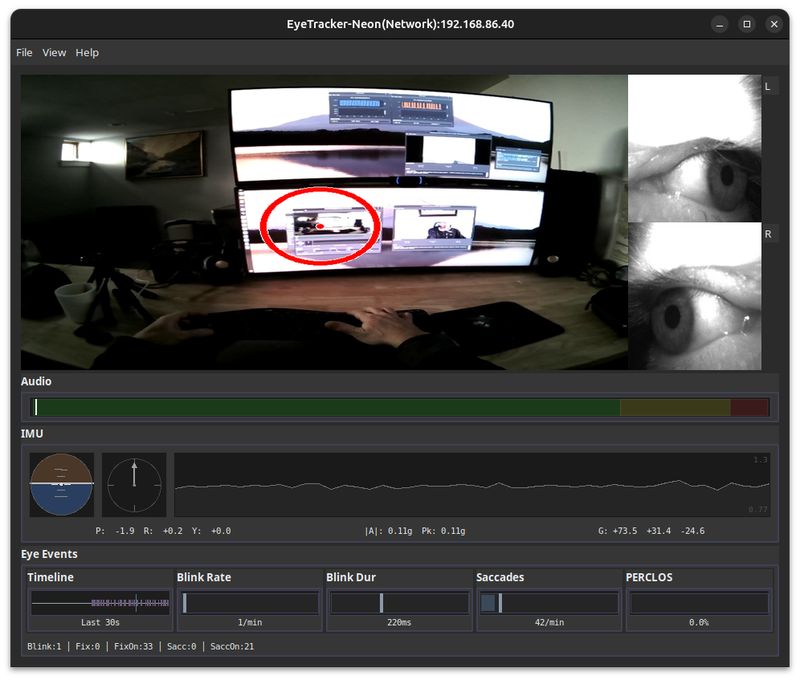
Device Status Panel
| Field | Description |
|---|---|
| Device | Connected device name |
| Status | Connection state (Connected/Disconnected) |
| Recording | Current recording state (Active/Idle) |
Controls
- Configure — Open device settings dialog
Hardware Specifications
The Neon device streams at fixed specifications that cannot be changed via API:
| Stream | Resolution | Frame Rate | Notes |
|---|---|---|---|
| Scene Camera | 1600x1200 px | 30 Hz | 103° x 77° field of view |
| Eye Cameras | 384x192 px (192x192 per eye) | 200 Hz | Infrared |
| Gaze Data | N/A | Up to 200 Hz | Varies by companion phone |
Our module receives these streams and can downsample/resize locally for smaller file sizes.
Recording Sessions
Starting Recording
When you start a recording session:
- Gaze data recording begins
- Scene video capture starts
- Optional: Eye camera video, IMU, audio, and events
During Recording
Each sample captures:
- Gaze coordinates (x, y) in scene camera view
- Pupil diameter for each eye
- Confidence values for gaze estimation
- Scene video with embedded timestamps
Data Output
File Location
{session_dir}/EyeTracker-Neon/Files Generated
| File | Description |
|---|---|
{prefix}_GAZE.csv |
Extended gaze data with pupil diameter (36 columns) |
{prefix}_WORLD_{w}x{h}_{fps}fps.mp4 |
World/scene video (participant's view) |
{prefix}_EYES_384x192_{fps}fps.mp4 |
Eye camera video |
{prefix}_EVENTS.csv |
Eye events (fixations, saccades, blinks) (24 columns) |
{prefix}_IMU.csv |
Head motion (accelerometer, gyroscope, orientation) (19 columns) |
{prefix}_AUDIO.wav |
Scene microphone audio (optional) |
Scene Video Format
| Property | Value |
|---|---|
| Container | MP4 |
| Codec | H.264 |
| Resolution | Configurable (default 1280x720, downsampled from 1600x1200) |
| Frame Rate | Configurable (default 10 fps, downsampled from 30 Hz) |
GAZE CSV Columns
Extended gaze data with 36 columns including eye position and eyelid metrics:
| Column | Description |
|---|---|
trial | Trial number (integer) |
module | Always "EyeTracker" |
device_id | Device identifier |
label | Optional trial label |
record_time_unix | System timestamp (Unix seconds, 6 decimals) |
record_time_mono | Monotonic time (seconds, 9 decimals) |
device_time_unix | Device timestamp (Unix seconds) |
device_time_ns | Device timestamp (nanoseconds) |
stream_type | Data stream classification |
worn | Glasses worn status |
x, y | Combined gaze position (normalized 0-1) |
left_x, left_y | Left eye gaze position |
right_x, right_y | Right eye gaze position |
pupil_diameter_left, pupil_diameter_right | Pupil diameters (mm) |
eyeball_center_left_x/y/z | Left eyeball 3D center position |
optical_axis_left_x/y/z | Left eye optical axis orientation |
eyeball_center_right_x/y/z | Right eyeball 3D center position |
optical_axis_right_x/y/z | Right eye optical axis orientation |
eyelid_angle_top/bottom_left, eyelid_aperture_left | Left eyelid metrics |
eyelid_angle_top/bottom_right, eyelid_aperture_right | Right eyelid metrics |
EVENTS CSV Columns
Eye events with 24 fixed columns:
| Column | Description |
|---|---|
trial | Trial number |
module | Always "EyeTracker" |
device_id | Device identifier |
label | Optional trial label |
record_time_unix | System timestamp (Unix seconds) |
record_time_mono | Monotonic time (seconds) |
device_time_unix | Device timestamp |
device_time_ns | Device timestamp (nanoseconds) |
event_type | fixation, blink, or saccade |
event_subtype | Event subtype classification |
confidence | Event confidence score |
duration | Event duration |
start_time_ns, end_time_ns | Event start/end (nanoseconds) |
start_gaze_x/y, end_gaze_x/y | Gaze position at start/end |
mean_gaze_x, mean_gaze_y | Mean gaze position during event |
amplitude_pixels, amplitude_angle_deg | Saccade amplitude |
mean_velocity, max_velocity | Velocity metrics |
IMU CSV Columns
Head motion data with 19 columns including orientation:
| Column | Description |
|---|---|
trial | Trial number |
module | Always "EyeTracker" |
device_id | Device identifier |
label | Optional trial label |
record_time_unix | System timestamp (Unix seconds) |
record_time_mono | Monotonic time (seconds) |
device_time_unix | Device timestamp |
device_time_ns | Device timestamp (nanoseconds) |
gyro_x, gyro_y, gyro_z | Gyroscope (rad/s) |
accel_x, accel_y, accel_z | Accelerometer (m/s²) |
quat_w, quat_x, quat_y, quat_z | Orientation quaternion |
temperature | Sensor temperature |
Timing and Synchronization
Timestamp Types
| Timestamp | Source | Use Case |
|---|---|---|
gaze_timestamp |
Pupil Labs device clock | Primary gaze timing |
record_time_unix |
Host system wall clock | Cross-system time reference |
record_time_mono |
Host monotonic clock | Cross-module synchronization (best for this) |
Cross-Module Synchronization
Use record_time_mono for precise cross-module sync with:
- Camera
encode_time_mono - Audio
write_time_monotonic - DRT
Unix time in UTC
Video-Gaze Alignment
Use FRAME CSV to correlate video frames with gaze data:
- Find
frame_indexfor desired video position - Match
capture_timestamptogaze_timestampin GAZEDATA - Gaze samples between frames belong to that time period
Data Interpretation
Gaze Position (norm_pos_x, norm_pos_y)
Normalized coordinates (0-1) in scene camera view:
- (0, 0) = top-left corner
- (1, 1) = bottom-right corner
To convert to pixel coordinates:
pixel_x = norm_pos_x * scene_width
pixel_y = norm_pos_y * scene_height
Confidence
Quality of gaze estimate (0-1). Higher values indicate more reliable tracking. Low confidence may occur when:
- Eyes are partially closed
- Glasses are slipping
- Infrared reflections interfere
Pupil Diameter
Measured in millimeters. Changes in pupil size can reflect:
- Cognitive load (larger during mental effort)
- Emotional response
- Lighting conditions (smaller in bright light)
Calibration
For accurate gaze data, calibrate before each session:
- Open the Neon Companion app — On the connected phone
- Select appropriate calibration method
- Follow on-screen instructions
- Verify accuracy — With validation targets
Recalibrate if:
- Glasses are repositioned on the participant's face
- Significant time has passed
- Gaze accuracy appears poor
Configuration
Click "Configure" to access device settings.
| Setting | Default | Description |
|---|---|---|
| Scene Resolution | 1280x720 | Output video resolution (downsampled from 1600x1200) |
| Scene FPS | 10 | Output frame rate (downsampled from 30 Hz) |
| Eyes FPS | 30 | Eye camera output rate (downsampled from 200 Hz) |
| Preview Preset | 4 (640x480) | Live preview resolution (0-8 scale) |
| Gaze Overlay | Enabled | Draw gaze position on recorded video |
| Audio Recording | Disabled | Record scene microphone audio |
Troubleshooting
Device not detected
- Check USB cable connection or WiFi network
- Verify Neon Companion app is running on the phone
- Check network settings if using WiFi (both devices on same network)
- Restart the module if needed
No gaze data appearing
- Ensure calibration was completed
- Check pupil detection in Neon Companion app
- Verify adequate lighting conditions
- Clean eye camera lenses (infrared cameras on inside of frame)
Scene video not recording
- Check scene camera connection
- Verify camera is not in use by another app
- Check available disk space
- Review module logs for errors
Poor gaze accuracy
- Recalibrate the tracker
- Ensure glasses fit snugly (not slipping)
- Check for reflections on lenses
- Verify pupil detection is stable in Companion app